Connect your apps and automate the follow-up
Opsei does not stop at the conversation. Outbound Automations push every new lead, customer, and ticket into your other tools the moment they happen, and Inbound Connectors let the AI pull live answers from your systems mid-conversation. Set it up once and it runs on its own.
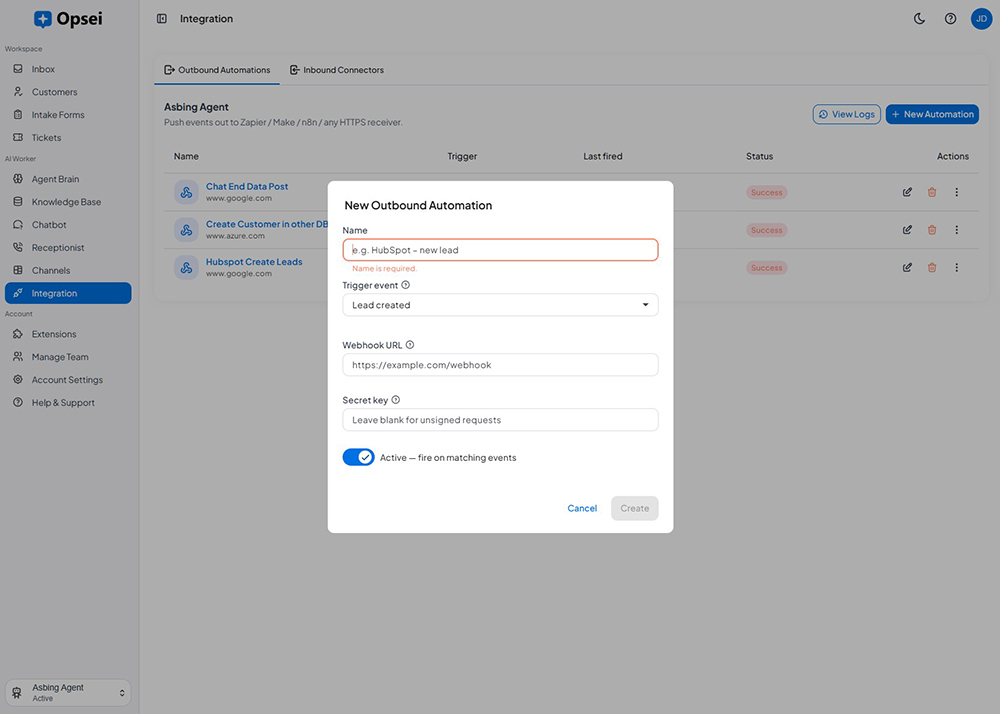
Two ways to plug Opsei into your business
Push data out when something happens, and pull data in while the AI is talking, both secure, logged, and testable.
Outbound Automations
Fire signed HTTPS webhooks on new leads, customers, tickets, and ended conversations - straight to your stack.
Inbound Connectors
Let the AI call your own HTTPS APIs mid-chat or mid-call to fetch order status, bookings, or account details.
Connect thousands of apps
Route events through Zapier, Make, or n8n to reach your CRM, spreadsheets, calendars, and back office.
Secure by design
HMAC-signed webhooks, HTTPS-only calls, SSRF protection, and per-agent rate limits keep every integration safe.
Logged & testable
Every delivery and lookup is logged with its payload and result, and you can test an endpoint before you rely on it.
Retries & reliability
Failed deliveries retry automatically, so a momentary blip never means a lost lead or a missed update.
Automate in three steps
Pick a trigger or endpoint
Choose an event to push out (new lead, ticket, ended chat) or an API for the AI to call during conversations.
Map & test
Map the fields, add your authentication, and run a test call to confirm the payload and response look right.
Go live
Opsei fires the automation on every matching event and folds live answers into conversations automatically.
Workflow Automation in the real world
Leads into the CRM, instantly
A property agency wanted every enquiry in HubSpot without manual entry. With an Outbound Automation, each new lead Opsei captures on any channel is pushed to HubSpot in real time through Zapier, complete with contact details, source, and transcript. The team stopped re-typing enquiries and follow-up started within seconds instead of hours.
Live order status on the call
An online retailer connected their order API as an Inbound Connector. Now when a customer asks "where is my order?", the AI looks it up mid-conversation and replies with the real tracking status, on both chat and voice - instead of "let me check and get back to you". Support tickets for order status dropped sharply.
Enterprise-grade security, built in
Your customer conversations are sensitive. Opsei protects them with the controls large enterprises expect - so you can put AI on the front line with confidence.
Access & audit control
Role-based access, single sign-on (SSO), and per-user audit logs so you always know who saw and did what.
Encryption everywhere
TLS 1.3 encryption in transit and AES-256 encryption at rest for every conversation, record, and file.
SOC 2 Type II
SOC 2 Type II controls with independent annual audits covering security, availability, and confidentiality.
Data residency
Tenant-isolated data that is never used to train third-party models, with US-based data residency available on enterprise plans.
Works with the tools you already use
Opsei plugs into your stack two ways: Automated Workflows push new leads, customers, and tickets out to your other apps the moment they happen, and Live Answers let the AI look up real information from your systems mid-conversation.
Automated Workflows (outbound)
Fire secure webhooks on every new lead, customer, ticket, or ended conversation. Connect to your CRM, back office, or thousands of apps through Zapier, Make, and n8n. Every delivery is logged, retried, and testable.
Live Answers (inbound connectors)
Let the AI query your own HTTPS APIs while it is talking to a customer - order status, bookings, account details, a customer's plan - and reply with the live result on both chat and voice.

